Quickstart#
Most people come to Layer for one of two jobs:
- You know what you want to trade, and want the best place to trade it.
- You want to find where the same bet is cheaper on one venue than the other.
Layer tells you which Kalshi and Polymarket US markets are the same bet. The Python SDK reads both venues' prices on your machine, with your own keys, and works out the fees. About five minutes to your first answer.
See it running: Spread#
Spread is an example bot that does both jobs on your machine, in paper mode: real order books, fake money. Clone it, run it, and change it however you like. The code is on GitHub at uselayer/layer-spread-bot. You need the Layer key and Kalshi key from steps 1 and 2.
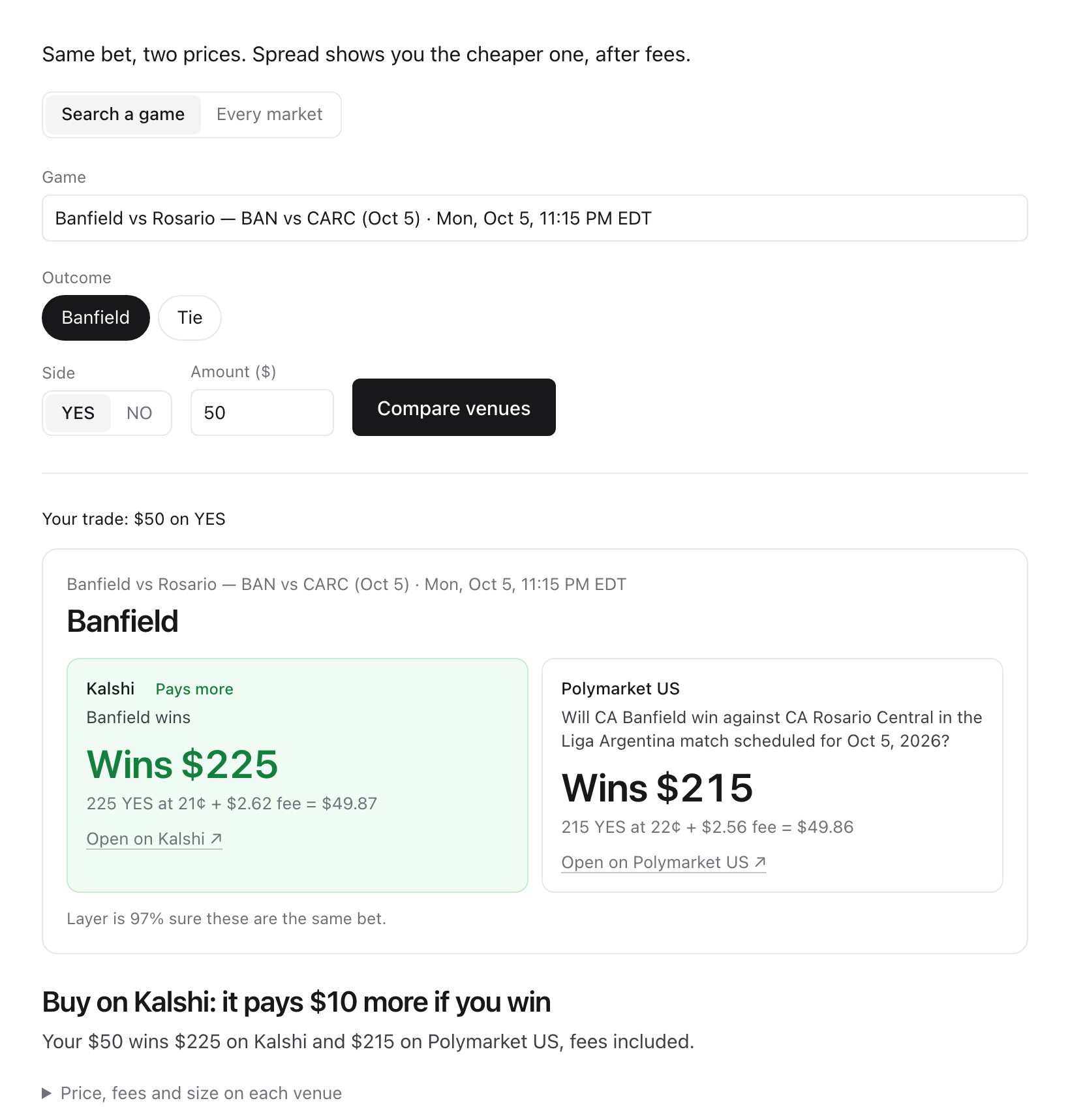
Example from Oct 5: $50 on Banfield to win. Kalshi pays $10 more if you win, fees included. On another bet it's Polymarket US.
git clone https://github.com/uselayer/layer-spread-bot
cd layer-spread-bot
npm run setup
cp .env.example .env   # add your keys
npm run dev            # then open http://127.0.0.1:3200
How it works and how to add your own strategy: Example bot: Spread.
1. Get a Layer key#
Go to uselayer.sh and click Get API access. Sign in with GitHub, Google, Discord, a wallet, or email. Onboarding asks you to accept the terms and what you're building, then creates your first key. It starts with lyr_.
Copy it right away — it's shown once. Layer only stores a hash of it. You can create, name, revoke and rotate keys any time on your dashboard.
export LAYER_API_KEY="lyr_your_key"2. Install the SDK and add your Kalshi key#
pip install uselayerPython 3.11 or newer. Kalshi's order books are read with your own Kalshi API key: create one in your Kalshi account settings (Ed25519 and RSA keys both work). It stays on your machine. Polymarket US prices need no key.
export KALSHI_KEY_ID="your_key_id"
export KALSHI_PRIVATE_KEY_PATH="~/.kalshi/key.pem"
3. Job 1: where should I trade this?#
You want YES on a market and you know its Kalshi ticker. Find its twin on Polymarket US, then price the same order on both venues, fees included. Paper mode reads the real books and never sends an order.
from uselayer import Client

client = Client()  # paper mode
ticker = client.matches(venue="polymarket_us", limit=1)[0].kalshi.market_id  # any live match; use your own ticker
found = client.match(ticker, venue="kalshi", with_="polymarket_us")
if not found["matched_market"]:
    raise SystemExit(found["reason"])  # e.g. no_candidate: no twin on Polymarket US
twin = found["matched_market"]["market_id"]

for venue, market in (("kalshi", ticker), ("polymarket_us", twin)):
    order = client.order(venue=venue, market=market, side="yes", price=0.60, size=100)
    p = client.preview(order)  # sends nothing
    print(venue, p.est_fill.avg_price, p.fees)
The cheaper venue is the one where the average price times 100, plus fees, is lower. Before you trade on either, check the match's caveats: they say where the two venues' rules differ (client.matches() also gives caveat_notes, quoting both venues' rules).
4. Job 2: where is the same bet cheaper?#
Buying YES on one venue and NO on the other, for the same matched outcome, pays exactly $1 per contract however it settles. It's worth doing when the two prices plus both fees come to less than $1. quote() checks both ways round for each match:
for m in client.matches(venue="polymarket_us", q="nfl", limit=20):
    q = client.quote(m)
    if q.net_profit_per_contract > 0:
        print(m.kalshi.market_id, q.a.side, q.b.side, q.contracts, q.net_profit_per_contract)
Found one? prices() shows both books, and profit() prices it at the size you want. An empty side of a book is None, so check both asks first:
p = client.prices(m)
k, u = p.leg("kalshi"), p.leg("polymarket_us")
if k.yes_ask and u.no_ask:
    body = {"contracts": 100, "kalshi": {"price": k.yes_ask}, "polymarket_us": {"price": u.no_ask}}
    r = client.profit(body, pair=m)
    print(r["net_profit"], r.get("return_per_day_pct"))  # return per day when a venue gives a time
A gap during a game can be a stale quote, and the best price may have only a few contracts behind it. quote() sizes to what both books can fill.
5. Practice, then trade#
client.trade(m, size=100, min_edge=0.01) places both legs with the leg-risk guard: if one side doesn't fill, the other is sold back. It runs in paper mode by default, and in live mode with your keys for both venues. See Python SDK for live mode, guardrails and the kill switch.
To practice a strategy on live markets first, try Nemi (how it works), our paper-trading experiment: it runs on Polymarket's BTC 15-minute markets against the real order books, with fake money. It's separate from Layer.
Without the SDK#
The matches are a plain HTTP API, so any language works:
curl -H "authorization: Bearer $LAYER_API_KEY" \
  "https://uselayer.sh/v0/matches?venue=polymarket_us&q=nfl&limit=3"
venue is polymarket_us (the default), polymarket (polymarket.com), hyperliquid (games, season winners, crypto prices and IPOs) or novig (sports game lines and season futures). You get back pairs of markets, one on each venue, that pay out the same way:
{
  "count": 3,
  "matches": [
    {
      "kalshi": { "venue": "kalshi", "market_id": "KXNFLGAME-26OCT04DALHOU-DAL", "url": "https://kalshi.com/markets/…", "…": "…" },
      "polymarket_us": { "venue": "polymarket_us", "market_id": "nfl-dal-hou-2026-10-04:long", "url": "https://polymarket.us/…", "…": "…" },
      "category": "sports",
      "confidence": 0.97,
      "basis": "identical",
      "caveats": [],
      "caveat_notes": {}
    }
  ]
}confidence— how sure Layer is that the two markets are the same bet, from 0 to 1.basis—identicalif the rules match exactly, orequivalent_with_caveatsif they pay out the same except in an edge case.caveats— which edge cases differ, for examplesource_differs. The full list, and how each venue handles a cancelled or postponed event, are in the Overview.caveat_notes—{}from the API: the notes quote the venues' rules, which stay inside Layer. The SDK writes them on your machine from the rules it reads.
Read prices from each venue's own API with the market ids, and check a trade's profit with POST /v0/profit. The uselayer command line runs the same lookups and profit checks from a terminal.
Limits#
- 60 requests per minute per Layer key. Over that you get
429 rate_limitedwith aretry-afterheader. Prices and orders go straight to each venue, so they don't count. - Keys can be sent as
authorization: Bearer <key>orx-api-key: <key>.
Next#
- Example bot: Spread — both jobs in a bot you can clone and run.
- Signals — Polymarket traders' track records, what they hold and every trade they make, built on the SDK.
- Nemi — our paper-trading experiment: run a strategy on live Polymarket BTC 15-minute markets against the real order books, with fake money. It's separate from Layer and reads Polymarket directly.
- Python SDK — live mode, guardrails, pairs and backtests.
- API reference — every endpoint, field and error.
- MCP server — matched markets, lookups and profit checks as tools in Claude Code, Cursor or any MCP client.
- How matching works — why you can trust a match, and how Layer checks itself against real results.